 LidbendyGet License · $2.99→
Your desktop bendsas you close the lid.
The fluid fold from iPhone Duo, for the lid you already have.Your desktop tilts, blurs and settles as it comes down.
Lidbendy for macOS- •One-time payment ($2.99)
- •Access for up to 3 personal Macs
- •Only for MacBook (Apple Silicon M1–M5, Pro & Max)
- •Lifetime updates included

LidBendy 1.1 — Blur Bend is here
A new way to close your MacBook.
Blur Bend keeps your desktop perfectly still while smoothly defocusing the screen as you close the lid. The blur follows the physical lid angle, creating a soft, natural transition instead of bending the desktop.
Version 1.1 — Blur Bend
- New Blur Bend closing mode
- Smooth progressive optical blur
- Uses your existing Clear Angle & Variable Blur settings
- Blur smoothly reverses when opening the lid
- Optimized for smooth 60 FPS rendering
- Performance and stability improvements
Free update for all existing license holders. Enter your existing key.
Will Lidbendy work on your Mac?
Select your MacBook model to verify native hinge sensor compatibility:
Full hardware lid angle sensor support across all Apple silicon chips up to M5, M5 Pro, and M5 Max. Smooth 120Hz ProMotion bending.
Real updates. Real demos. Direct from the developer.
Follow the development of Lidbendy, watch live video demonstrations, and see new features built live by @hukambuild.
Apple announced iPhone Duo and like everyone else, I couldn't stop watching the fold animation.
So I built it for the Mac. (sound on 🔊)
• Native lid angle sensor detection
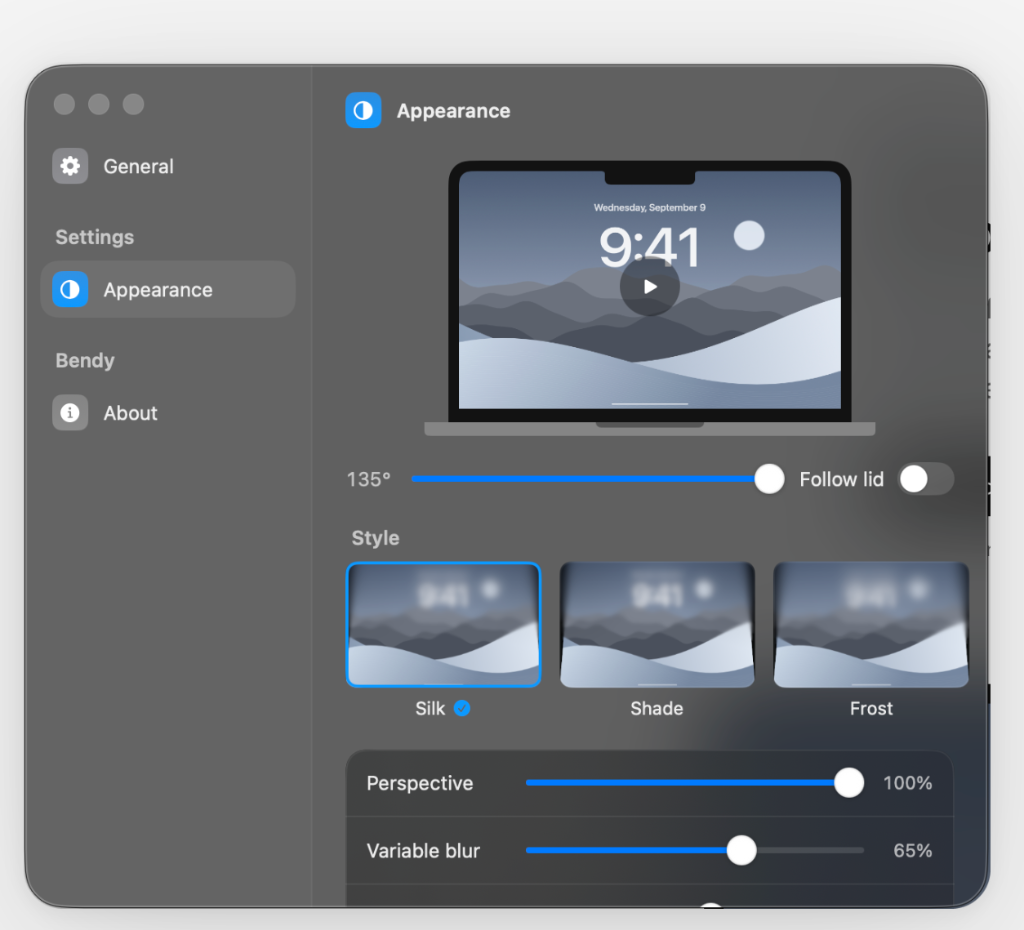
• Silk, Shade & Blur Bend styles
How it works
- Lid sensor
- Reads the hinge angle directly from the Mac's native hardware sensor. No polling, no accessibility hacks.
- Save your angle
- Save your custom clearance angle where the desktop begins bending or clears in Appearance settings.
- Live desktop
- Captures the screen and renders the tilt with Metal shaders, so windows and wallpaper move synchronously.
- Three styles
- Silk, Shade and Frost. Tune perspective, blur and shadow, or set the custom angle where it clears.
- Sound
- A soft click when the lid opens and the desktop clears. Switch it off in General anytime if you'd rather not.
- Menu bar
- Lives quietly in the menu bar. Pause anytime with a single click or Esc key.
Requirements
- macOS
- 14 Sonoma or macOS 15 Sequoia.
- Hardware
- Apple silicon MacBook with a lid angle sensor (M1, M2, M3, M4, M5, M5 Pro, M5 Max).
- Permissions
- Screen Recording, so the desktop wallpaper and open windows can be shaded.
Private by design
- 100% On-device
- Frames are processed in volatile GPU memory on your Mac. Nothing is recorded, saved, or uploaded anywhere.
- No account required
- Pay once, download the DMG, drag to Applications. Your license key arrives instantly and works on up to three personal Macs.
Peace of mind
- One-time fee
- Pay $2.99 once and keep it forever. Free updates included with zero recurring fees or subscriptions.
- Encrypted checkout
- Handled securely by Dodo Payments with bank-grade 256-bit SSL encryption. We accept Apple Pay, Google Pay, Visa, Mastercard, and Amex.
- Developer support
- Direct human support from Hukam Singh. Email anytime at hukambuild@gmail.com for prompt help.
Clear answers. Zero surprises.
Everything you need to know about safety, privacy, and licensing before downloading.
Not at all. Lidbendy renders with native Apple Metal shaders that trigger only when the lid is actively moving. When your lid is open and still, CPU and GPU usage drops to 0.0%. There is zero background indexing, polling, or heavy resource overhead.